Consider supporting us by disabling your ad blocker / add to whitelist / purchasing VIP.


binbow
-
Posts
879 -
Joined
-
Last visited
-
Days Won
51
Content Type
Profiles
Forums
Blogs
Gallery
Downloads
Store
Lyrics
News
Guide
Events
Posts posted by binbow
-
-
On 9/10/2025 at 4:56 PM, Armyboii77 said:
HEY GUYZ
The link is not working for me can someone plz sent it to me on discord or something
Discord: arkhunter_1010I have temporarily moved to the following link.
https://drive.google.com/file/d/1cAdO69huMM_yKNFJYbeRyxazNB3n3Gsu/view?usp=drive_link -
When repurposing a generic car, you need to set a price. Open the Miscellaneous tab in tdu2vpe, enter a number in the Price field, and click Apply to set the price. This should make it visible at the dealership. Please try.
-
I'm very sorry, but I can't think of anything right now. I'm going to reinstall TDU2 right away, so please let me know the details of the situation so that I can reproduce the experiment and find out what changes caused the dealer to disappear (?).
-
On 7/14/2025 at 2:09 PM, MaeveSterling said:
Ummm....I used Tdu2VPe, I installed tdudec and It freezes, What's wrong?
Does "freeze" mean that the computer stopped responding? Or does it mean that tdu2vpe stopped working?
Please provide detailed information about what you did and what happened. -
@Gabriel184747, @malla, @Wicenator
I uploaded it here, though old version. -
I will upload it somewhere as soon as it's ready. However, it needs some work, so please wait a little while.
-
Sorry, I can't investigate this right now because I don't have an environment which I can run the game. I'll investigate as soon as possible.
By the way, does this happen for all vehicles?
What about engine RPM or other items? -
Sorry for the late reply.
I think the display of that part of the image is in a file that vpe doesn't handle.
If you run a vehicle in the game, the value you changed in vpe should be reflected. Try setting it to 60km/h Max, for example. -
7 hours ago, SavaJan said:
Can i use it on online.
Unfortunately, it's not accessible online.
-
On 2/15/2025 at 6:41 PM, dotrung56 said:
when I launched the game, everything works fine expect that there's no sound
does anyone know how to fix that ?
Is it okay for things other than games (music, etc.)?
-
On 10/8/2024 at 1:37 AM, RASTA said:
how do i get totdu2 vpe mod how do get it
Download it here: https://www.mediafire.com/file/0fk3l26j6pwsrph/TDU2VPE_ver3.5.5.0.zip/file
-
Filling "00" means that, for example, if you want to make a Lotus 2-Eleven tunable, you would change the "90010000" part to "00000000". "90010000" is the hexadecimal code for the Lotus 2-Eleven car code 400.
The method shown there is to make a "club car" tunable. Motorcycles are not included. Although it has not been confirmed, I think that motorcycles can probably be tuned with tdu2vpe. -
5 hours ago, Superninja167 said:
I've used different versions of the vpe over the years three things that have changed recently was bringing over the game from a windows 7 pc to my windows 10 laptop, installing project paradise 2 and adding the dxvk dll file for the map crash fix. Also to note is im running both the unofficial patch and one of stargt's autopack cant remember which one but basically I have many car mods installed
tdu2vpe has only been tested to work with TDU2 V0.34 build16 + Unofficial patch0.4. Unfortunately, there are no plans to test it on versions other than the above.
-
On 5/31/2024 at 6:58 PM, Superninja167 said:
I have a really weird issue where If I change any car name all the dealerships disappear from the map and cannot be entered even when changing my golf gti to golf R. I'm using ver 3.550 and had to use the restore function to reverse the problem
Sorry, but I can't immediately think of any possible causes.
Did you change something? When did the problem start? Has it been the same since you first started using tdu2vpe?
I don't have a PC environment which I can check or verify it right now, so I don't think I can help you right away. -
5 hours ago, qas51 said:
The tool, after I'm done editing, keeps deleting the ''db_data.cpr'' file from the TDU2 Unpacked folder. Suggestions?
(this Is the third time that happens)If the folder containing "db_data.cpr" (that is, the folder where TDU2 unpacked is installed) is write-protected, this may happen. Although I have inserted code to avoid such situations, there is a possibility that something has been left out. Could you check it from that point of view.
-
Click "NEXT" to switch to a dialog for entering the serial number.
Enter the license code and press "OK" to start the game.
-
21 hours ago, undetect said:
Can u create TduVpe for other version .. ? Like my vers.069 ..
i now the program only read the "db_" only and change with your program ..
I just dont have the program can be read ".cpr" file..
.
Can u build other version.. ? That will help other trouble.
I am very sorry, but due to the structure of the VPE program, it is difficult to support database files of other versions.
The file for updating to v34 build16 has been uploaded to this site, so I recommend that you use it. -
14 hours ago, Vicky said:
I have sent the file, I hope it helps.
Received. I will investigate.
--- edit ---
When I used the dbdata.cpr file you sent me, I was able to make changes without any problems on my PC.
And then, I have noticed one thing. tdu2vpe creates some working files and folders in its own folder. If some kind of error occurs during work, it is likely that the error will remain in the above working folder and files. To avoid this trouble, it is better to delete the whole tdu2vpe folder and install it again. -
@Vicky:
If possible, could you please send your "db_data.cpr" file to [email protected] as an email attachment?
-
3 hours ago, Vicky said:
I'm really sorry but everything I have done is correct, I have doubled checked the version I am using (v.34 b16) plus I do not plan on playing TDU 2 online nor have it downloaded. I have also checked that the folders are not write-protected. I have even disabled Windows security just to be sure. I am of course using the unpacked version since I have car mods installed. It's really whenever I exit the application somehow makes it crash on every version I test it including the one you sent me.
Sorry for not being able to provide a useful remedy.
-
9 hours ago, Vicky said:
Sorry to say that it still does not work, the same error still happens. I already have reinstalled everything just to double check. I'm going to try and find another version of tdudec to see if it fixes the error.
Let me just to make sure, what you're trying to edit is the unpacked version of the atari version of tdu2, right? The tdu world version is not supported.
p.s. :
Please check that the relevant folders and files are not write-protected.
-
5 hours ago, Vicky said:
Yes, everything is correct.
It is not sure if it fixes the reported error, but try ver.3.5.5.0.
This is a test version in the process of cleaning up and reviewing data access methods. -
@Vicky:
Is the TDU2 version DLC2 v0.34 build16?
-
22 hours ago, robin1999 said:
I tried to add cayman gt4 but its not working also I tried to add bunch of cars but its not even working what do I do? also i dont see any changes in game is it because of uplauncher or should i use another launcher please reply
The uplauncher checks the files and restores them to their original state if they have been modified.
You need to use a special launcher like Knyazev : TDU2 Universal Launcher [v3.6].12 hours ago, Vicky said:Hello, there seems to be an error whenever I try to exit the editor after modifying the vehicles. I'm sure I did all the steps correctly in configuring the editor. Are there any possible causes for this issue?
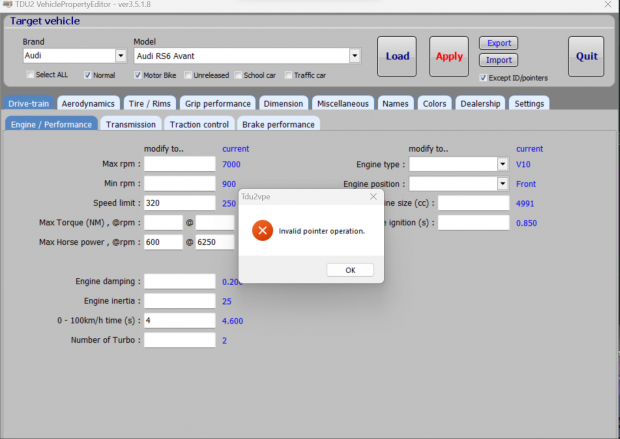
Can you check the size of the file "db_data.cpr". Is the file size 1192KB?
I can't think of anything else right now. I'll post again if I come up with something.


TDU2VPE Release
in Tools / Others Mod
Posted