We promise no intrusive ads, Please help keep the community alive
Consider supporting us by disabling your ad blocker / add to whitelist / purchasing VIP.
Consider supporting us by disabling your ad blocker / add to whitelist / purchasing VIP.


Quakes69
-
Posts
6 -
Joined
-
Last visited
-
Days Won
1
Quakes69's Achievements





-
 andrey zyb reacted to a review on a file:
TDU savegame account editor
andrey zyb reacted to a review on a file:
TDU savegame account editor
-
Version 1.0.0
48 downloads
I made this Offline profile from my Original legit account. Years ago there was forum thread on the original Test Drive Unlimited Web Sight this sight became of that had instructions on how to edit online offline profiles together. Since then that thread was lost or I have yet to find it again. This profile was from my Original Online TDU Gamespy game play. I split my Online info and merged it into an Offline account. The $$$ Came from the certain car selling Glitch. Thanks to this tool, I made the Offline profile into an Online Profile that can be played Online with the help with the Online d3d9.dll file, Project Paradise. Prerequisites * TDU savegame account editor * Test Drive Unlimited * TestDriveUnlimited_USRetailandDigitalDistribution_Patch_Ver1.66A.exe * Test Drive Unlimited Bonus Pack.exe * Project Paradise or TDU Platinum v1.+ * And ANYTHING above Profile: My-FAKE-ACT [email protected] password - 123456 Champion - Without TDU Platinum v1.+ ACE - With TDU Platinum v1.+ $108,568,945 "Properties" - Cars(51), Motorcycles(5), Houses(22) 295 Clothes Tickets - Closet full of countless outfits. BACKUP Existing Game Profile! Extract to - %SystemDrive%\Users\%USERNAME%\Documents Open with "TDU savegame account editor" change the Nickname to your own. Change the Password to your own. Will need to be online verified with Project Paradise server once your change your nickname, and password. Thanks, Quakes69 - TDU Edit: Update I found the guide buried Here This is the guide that I made multiple offline profiles with. Now you can enjoy my fruits of my profile.Free -
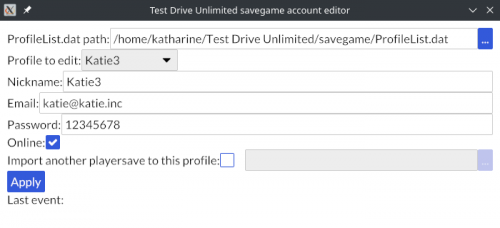 I made this Offline profile from my Original legit account. Years ago there was forum thread on the original Test Drive Unlimited Web Sight this sight became of that had instructions on how to edit online offline profiles together. Since then that thread was lost or I have yet to find it again. This profile was from my Original Online TDU Gamespy game play. I split my Online info and merged it into an Offline account. The $$$ Came from the certain car selling Glitch. Thanks to this tool, I made the Offline profile into an Online Profile that can be played Online with the help with the Online d3d9.dll file, Project Paradise. Prerequisites * Working Test Drive Unlimited * TDU savegame account editor * TestDriveUnlimited_USRetailandDigitalDistribution_Patch_Ver1.66A.exe * Test Drive Unlimited Bonus Pack.exe * Project Paradise or TDU Platinum v1.+ * And ANYTHING above Profile: My-FAKE-ACT [email protected] password - 123456 Champion - Without TDU Platinum v1.+ ACE - With TDU Platinum v1.+ $108,568,945 "Properties" - Cars(51), Motorcycles(5), Houses(22) 295 Clothes Tickets - Closet full of countless outfits. BACKUP Existing Game Profile! Extract to - %SystemDrive%\Users\%USERNAME%\Documents "\Test Drive Unlimited\savegame" Open with "TDU savegame account editor" change the Nickname to your own. Change the Password to your own. Will need to be online verified with Project Paradise server once you change your nickname, and password. Thanks, Quakes69 Edit: Update I found the guide buried Here This is the guide that I made multiple offline profiles with. Now you can enjoy my fruits of my profile. Test Drive Unlimited.rar
-
- 1
-
-
Test Drive Unlimited: Project Paradise [v0.03A PUBLIC BETA AVAILABLE!]
Quakes69 replied to Speeder's topic in TDU - Support
Like to say Thanks to all that made this possible. Thank You! You can use RivaTuner with Stealth mode on. Stealth Mode on. See onscreen display for proof. Them bloody framerates... :P TDU: 1.6.8B WinXP Mobo: Asus P5SLI GPU's: Geforce 230 1.5gb x2 Mem: 4gb - 3gb recognized by 32bit system -
What anyone thinks that this is a subject of miss use is completely wrong. I have posted this on the official site many times before Atari went down. These are not registry keys and can be deleted with out consequences. A Re-Install can then be proceeded with out problems. Keys can be found and "DELETED" for re-install are as follows; WinXP and below: C:\Documents and Settings\All Users\Application Data\Test Drive Unlimited\CDKey.txt - Game C:\Documents and Settings\All Users\Application Data\Test Drive Unlimited\Addon.txt - MegaPack WinVista and Above: Sorry I do not know. I don't have TDU installed on anything else other than WinXp. P.S. These have nothing to do with Cracking, Hacking, or any of the sorts. These files only validate the installed item(Game, Addon). These files WILL NOT UNINSTALL if you try to uninstall the game. So these files have to be searched for and deleted manually. Have a nice day! Quake